# Webhook Into Zapier

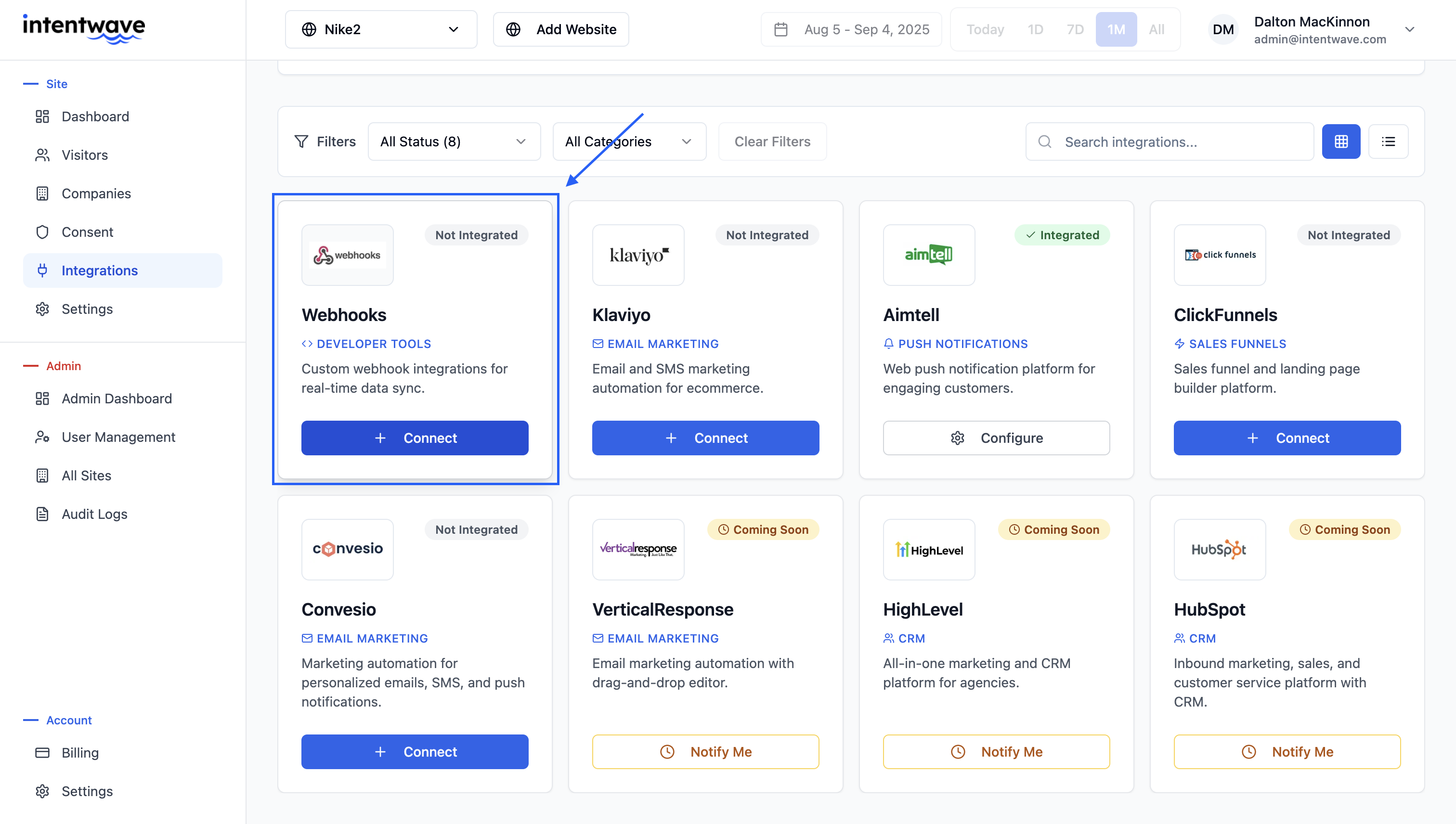
Zapier is an automation tool that connects apps and moves data between them based on triggers and actions, without requiring coding. If we don't natively support the integration you are looking for you can use connect your data from our dashboard into your desired platform.

### Getting Started With Connecting Webhooks to Zapier <a href="#getting-started-with-connecting-webhooks-to-zapier" id="getting-started-with-connecting-webhooks-to-zapier"></a>

Follow these simple steps to get Intentwave integrated into Zapier using Webhooks. If you don't already have a Zapier account you can sign up for a [free trial here!](https://zapier.com/l/home?utm_source=google\&utm_medium=cpc\&utm_campaign=gaw-usa-nua-search-desktop-brand-long_tail\&utm_term=zapier%20sign%20up\&utm_content=9001881\&utm_ads_campaign_id=17613359691\&utm_ads_adset_id=139730154898\&utm_ads_ad_id=608807048115\&gad_source=1\&gclid=CjwKCAiA7Y28BhAnEiwAAdOJUCjSXTiVi0mdCTAjU108ng0sxriSw63o8zg4X7QsoQst7KJd2JfAHxoC1pkQAvD_BwE)

**The estimated set-up time is: 2 mins**

#### Step 1 <a href="#step-1" id="step-1"></a>

Create a new Zap: Once you login you'll want to create a new zap by selecting create > Zaps

<figure><img src="https://docs.intentwave.com/~gitbook/image?url=https%3A%2F%2F137405476-files.gitbook.io%2F%7E%2Ffiles%2Fv0%2Fb%2Fgitbook-x-prod.appspot.com%2Fo%2Fspaces%252Ft3vgrgHGOHJ48WlMVVJn%252Fuploads%252FUjRLdN0irgzh2SNP9CHM%252Fimage.png%3Falt%3Dmedia%26token%3D54bf4878-45b2-499d-8bb1-0a29656929b2&#x26;width=768&#x26;dpr=4&#x26;quality=100&#x26;sign=567028fd&#x26;sv=2" alt=""><figcaption></figcaption></figure>

#### Step 2 <a href="#step-2" id="step-2"></a>

Set up your Trigger: Select **Trigger** > select **webhooks** > select **Choose an Event >** select **Catch Raw Hook >** select **Continue**

<figure><img src="https://docs.intentwave.com/~gitbook/image?url=https%3A%2F%2F137405476-files.gitbook.io%2F%7E%2Ffiles%2Fv0%2Fb%2Fgitbook-x-prod.appspot.com%2Fo%2Fspaces%252Ft3vgrgHGOHJ48WlMVVJn%252Fuploads%252Foxr7MJBLcULCbgApRuqq%252Fimage.png%3Falt%3Dmedia%26token%3D500400a1-8e42-4bc5-8a54-eec738f5d3a2&#x26;width=768&#x26;dpr=4&#x26;quality=100&#x26;sign=1d20808e&#x26;sv=2" alt=""><figcaption></figcaption></figure>

<figure><img src="https://docs.intentwave.com/~gitbook/image?url=https%3A%2F%2F137405476-files.gitbook.io%2F%7E%2Ffiles%2Fv0%2Fb%2Fgitbook-x-prod.appspot.com%2Fo%2Fspaces%252Ft3vgrgHGOHJ48WlMVVJn%252Fuploads%252FS1ra1RHTvWIfm54Yu1oH%252Fimage.png%3Falt%3Dmedia%26token%3Df71d4960-fbd4-452f-8e07-3c976a5cd874&#x26;width=768&#x26;dpr=4&#x26;quality=100&#x26;sign=69f0f9a7&#x26;sv=2" alt=""><figcaption></figcaption></figure>

<figure><img src="https://docs.intentwave.com/~gitbook/image?url=https%3A%2F%2F137405476-files.gitbook.io%2F%7E%2Ffiles%2Fv0%2Fb%2Fgitbook-x-prod.appspot.com%2Fo%2Fspaces%252Ft3vgrgHGOHJ48WlMVVJn%252Fuploads%252FxB4ARw9NR3u2WwaEvblh%252Fimage.png%3Falt%3Dmedia%26token%3D6f82a3f9-b69d-4079-9cf6-9320d7bce27e&#x26;width=768&#x26;dpr=4&#x26;quality=100&#x26;sign=b8702ecb&#x26;sv=2" alt=""><figcaption></figcaption></figure>

#### Step 3 <a href="#step-3" id="step-3"></a>

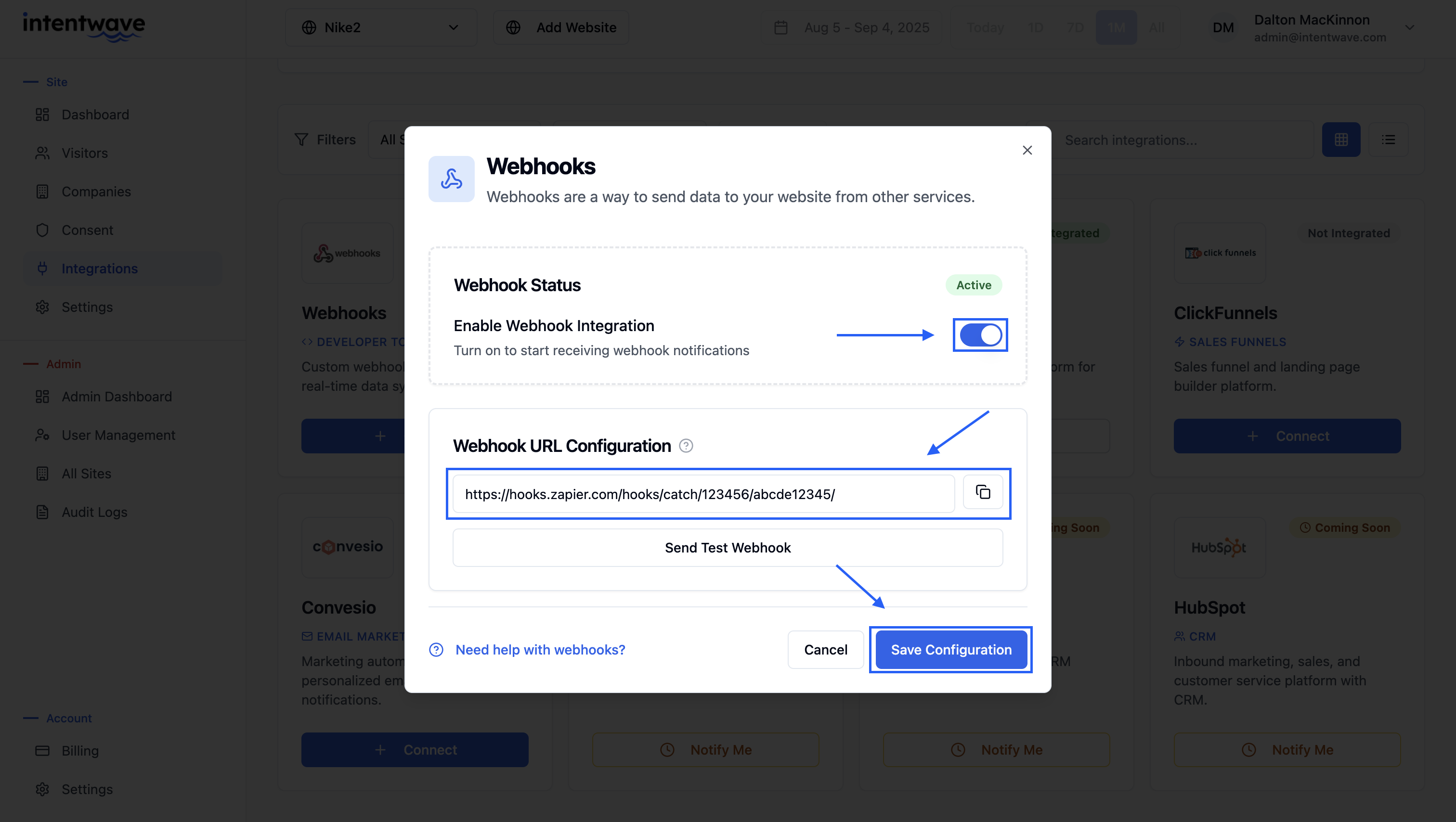
Webhook URL set up: Copy your webhook URL > navigate to **Integrations** > select **webhooks** > paste your Zapier webhook > **Save Changes** > select **send preview**

<figure><img src="https://406639391-files.gitbook.io/~/files/v0/b/gitbook-x-prod.appspot.com/o/spaces%2FQo6j1cPebJLIA897YdUN%2Fuploads%2FlJ3uWzo6b8fjpHuyXcUV%2FScreenshot%202025-09-04%20at%203.21.47%E2%80%AFPM.png?alt=media&#x26;token=e7874de8-8d33-4d55-88fb-1350bec80787" alt=""><figcaption></figcaption></figure>

<figure><img src="https://406639391-files.gitbook.io/~/files/v0/b/gitbook-x-prod.appspot.com/o/spaces%2FQo6j1cPebJLIA897YdUN%2Fuploads%2FQEtPwrBfnSzwGTGD9P3h%2FScreenshot%202025-09-04%20at%203.23.30%E2%80%AFPM.png?alt=media&#x26;token=1db08dbb-b18b-4cb5-a7d0-4547c05473e2" alt=""><figcaption></figcaption></figure>

<figure><img src="https://docs.intentwave.com/~gitbook/image?url=https%3A%2F%2F137405476-files.gitbook.io%2F%7E%2Ffiles%2Fv0%2Fb%2Fgitbook-x-prod.appspot.com%2Fo%2Fspaces%252Ft3vgrgHGOHJ48WlMVVJn%252Fuploads%252FKDPAZzs63yUT6C65bCqb%252Fimage.png%3Falt%3Dmedia%26token%3D06067e69-7673-4cef-b7d1-64ba85679304&#x26;width=768&#x26;dpr=4&#x26;quality=100&#x26;sign=37120a02&#x26;sv=2" alt=""><figcaption></figcaption></figure>

#### Step 4 <a href="#step-4" id="step-4"></a>

Set Up desired field: After you select send preview go back to zapier and select **Test Trigger >** select the new request that has come through

<figure><img src="https://docs.intentwave.com/~gitbook/image?url=https%3A%2F%2F137405476-files.gitbook.io%2F%7E%2Ffiles%2Fv0%2Fb%2Fgitbook-x-prod.appspot.com%2Fo%2Fspaces%252Ft3vgrgHGOHJ48WlMVVJn%252Fuploads%252F8G2OOOro1WJthgYd5Yv9%252Fimage.png%3Falt%3Dmedia%26token%3Ddf765566-16f9-441c-b178-cb90dc3a5a2a&#x26;width=768&#x26;dpr=4&#x26;quality=100&#x26;sign=42aad0c4&#x26;sv=2" alt=""><figcaption></figcaption></figure>

#### Step 5 <a href="#step-5" id="step-5"></a>

Select your desired platform: Select the platform that you would like to send the data to > connect your account > choose the fields you would like to send over > turn on your Zap and data will flow seamlessly to your desire location

<figure><img src="https://docs.intentwave.com/~gitbook/image?url=https%3A%2F%2F137405476-files.gitbook.io%2F%7E%2Ffiles%2Fv0%2Fb%2Fgitbook-x-prod.appspot.com%2Fo%2Fspaces%252Ft3vgrgHGOHJ48WlMVVJn%252Fuploads%252Fjq2gUqBVMXcOSZi7jMRF%252Fimage.png%3Falt%3Dmedia%26token%3D75e8a786-760b-4732-b611-407be85687c0&#x26;width=768&#x26;dpr=4&#x26;quality=100&#x26;sign=5c6457f3&#x26;sv=2" alt=""><figcaption></figcaption></figure>

Congratulations on setting up your Zapier Integration and getting one step closer to turning

Consent into Commerce with Intentwave!

If you need support contact us at <support@persistent.id>


---

# Agent Instructions: Querying This Documentation

If you need additional information that is not directly available in this page, you can query the documentation dynamically by asking a question.

Perform an HTTP GET request on the current page URL with the `ask` query parameter:

```
GET https://documentation.intentwave.com/platform-integrations/webhook-into-zapier.md?ask=<question>
```

The question should be specific, self-contained, and written in natural language.
The response will contain a direct answer to the question and relevant excerpts and sources from the documentation.

Use this mechanism when the answer is not explicitly present in the current page, you need clarification or additional context, or you want to retrieve related documentation sections.