# How to track sources and destinations using UTM Parameters?
**Method 1: Dashboard**
Scroll down on the dashboard until you see **Top Sources** and **Top Pages**. These two sections represent where your web visitors came from and which pages they visited most after landing on the homepage. This provides an overview of your marketing effectiveness and your visitors' interests.
***Note:*** When you first log into your dashboard, you may see a blank page indicating that data is unavailable. This is because collecting consent and processing records typically takes a few days. Sit tight—your report will be generated as soon as the data starts coming in.
**Method 2: Visitor Profile**
Click on an individual record on your Visitors page to access a detailed visitor profile. This includes their **consent record, last visit time, the channel through which they were acquired, and the pages they visited.**
Gaining these insights at the individual level is crucial for understanding your visitors better, especially in B2B scenarios.
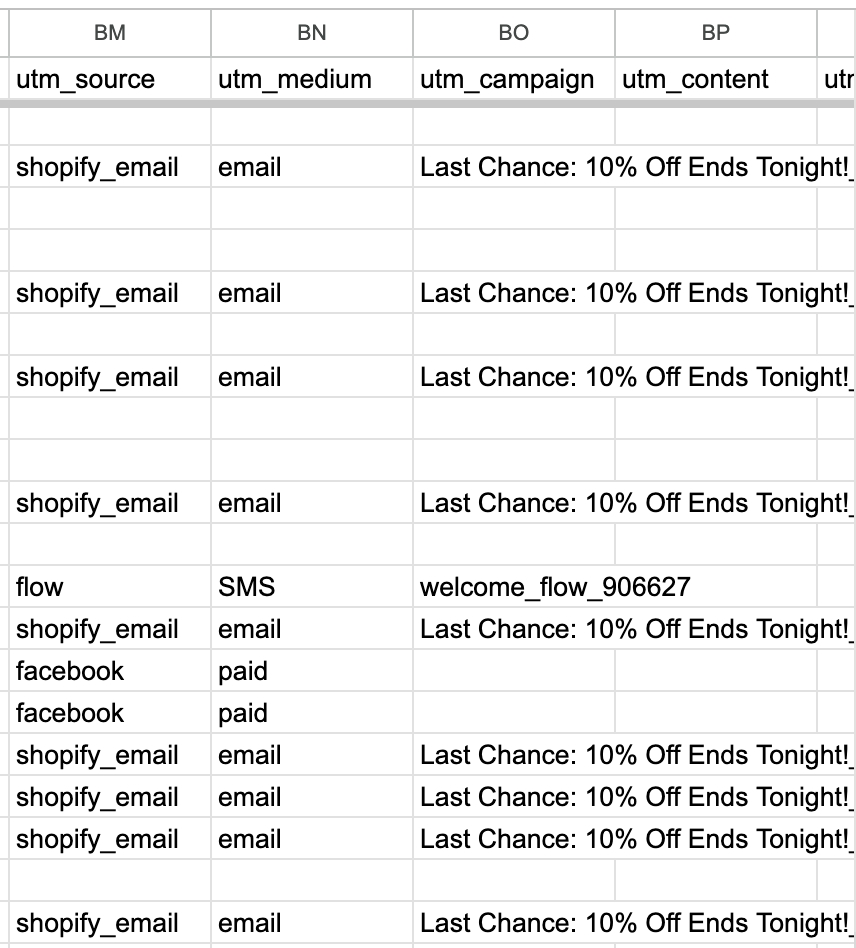
**Method 3: CSV Form**
After downloading the visitor CSV form, scroll to the right to view the UTM parameters. These columns contain information about the **visitors' acquisition media channels, advertising platforms, campaigns, and content.**
---
# Agent Instructions: Querying This Documentation
If you need additional information that is not directly available in this page, you can query the documentation dynamically by asking a question.
Perform an HTTP GET request on the current page URL with the `ask` query parameter:
```
GET https://documentation.intentwave.com/product-faq/how-to-track-sources-and-destinations-using-utm-parameters.md?ask=
```
The question should be specific, self-contained, and written in natural language.
The response will contain a direct answer to the question and relevant excerpts and sources from the documentation.
Use this mechanism when the answer is not explicitly present in the current page, you need clarification or additional context, or you want to retrieve related documentation sections.